
Home » Download
Get the Official F111 Mobile App for Faster Play on the Go
Download the official app for fast logins, live scores, and safe play
Looking for F111 app download? The official app is built for quick access on mobile data, low storage use, and trusted login. Get live cricket updates, faster odds refresh, and smooth slots play, including JILI favourites. Install in minutes and keep your account protected with PIN or fingerprint.
Only install from the official source. For the safest path and the latest builds, use F111 Online and avoid copies from third-party stores or random links shared on social media.

Why the F111 app saves data, loads faster, and keeps your play private
Prefer direct installation and tighter control? Download the official build of F111 APK to get better performance on mobile networks, instant access to live markets, and privacy-first sessions that keep your details safe.
Faster access on mobile networks
The app caches visuals and key pages so markets load quickly, even on busy 4G. Less waiting, more time placing picks before prices move.
Quick login with biometrics and one-tap re-entry
Save your device, set a PIN or use fingerprint/Face ID, and get back in with one tap. No repeated password typing on small screens.
Live cricket tracking and smarter bet slips
Follow ball-by-ball scores, price swings, and session markets. Build slips fast with auto-fill stakes and quick-edit legs for your cricket plays.
Slots and JILI content optimised for touch
Spin top JILI titles with large buttons, clear paytable views, and landscape/portrait support. The lobby highlights new releases and your recent games.
Private by design with secure sessions
Encrypted sessions, device binding, and logout timers guard your profile. You stay signed in securely while still in full control on shared phones.
Step-by-step guide to download, install, and verify your F111 mobile apk
- Open the official F111 site in your mobile browser to get the latest app link.
- Tap the Android or iOS button to start the installer or access guide for your device.
- On Android, confirm the security prompt and allow your browser to install this apk when asked.
- When the file finishes, tap Open, then Install. Wait for completion and add the apk to Home Screen.
- On iOS, follow the on-screen steps. You may add the web app to Home Screen for instant access.
- Launch the app, allow notifications for price changes, results, and account alerts.
- Log in with your saved credentials or create a new account in a few steps.
- Verify your profile details and set up PIN or biometrics for quicker, safer re-entry.
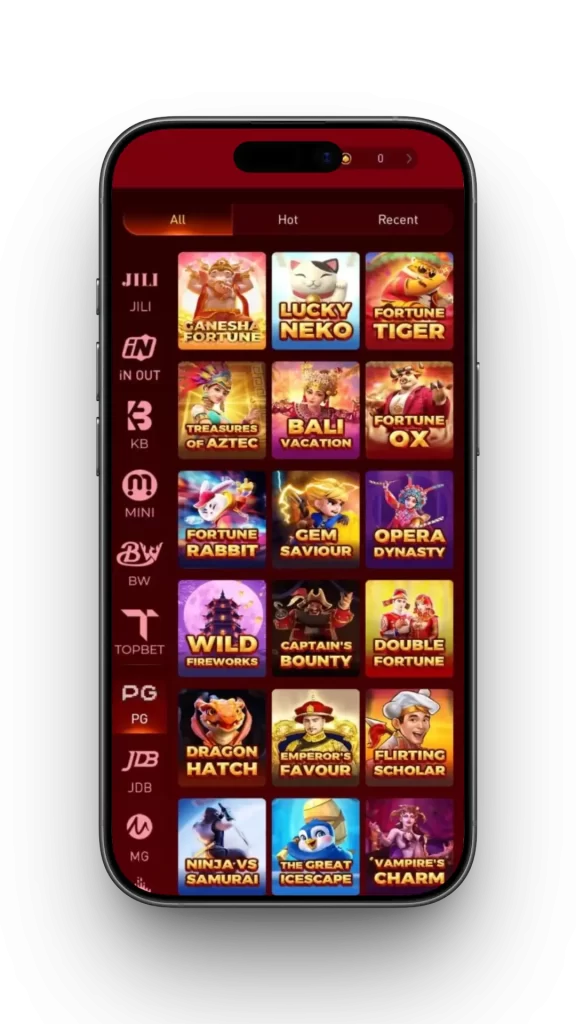
Mobile features built for speed, control, and real-time sports action
- One-tap login using PIN, fingerprint, or Face ID for quick entry.
- Low data mode and cached assets for faster loads on 3G/4G.
- Live cricket centre with dynamic odds, scorecards, and quick stake presets.
- JILI slots lobby with quick filters, recent games, and high-visibility controls.
- Smart search for leagues, matches, markets, and slot providers.
- Clean navigation, fewer distractions, and easy access to bet history.
- Notifications for results, price moves, app updates, and important account alerts.
Safe installation habits, permission control, and the official update routine
Install only from the official site. Check the URL, security padlock, and in-app version details. Do not use APK mirrors or links forwarded in group chats. This keeps your account, funds, and device safe from tampered files.
Review permissions during install. Enable notifications for results and price alerts, but keep sensitive permissions off if not needed. Set a strong PIN and use biometrics to protect access on shared devices.
Keep the app updated. New versions improve speed and fix bugs. Avoid third-party cleaners that remove app data. Verify your profile so your account name matches payout details for smoother withdrawals later.
F111 app download and installation FAQs for Android and iOS users
How do I get the official F111 app safely?
Open the official website on your phone and use the Android or iOS buttons shown. Avoid third-party stores or file-sharing links.
Is Android installation safe when I see a security prompt?
Yes—if the file is from the official site. Approve “Allow from this source” for your browser, install, then disable that toggle afterward if you prefer.
Can I use the app on iPhone?
Yes. Follow the iOS guide on the official site. You may add the web app to your Home Screen for instant access and push-style alerts.
How do I update to the latest version?
Open the app and follow any update prompts, or revisit the official site and tap the download button again to replace the old build.
Why do I need to verify my identity after installing?
Verification protects your account and helps match your profile name to your payout details. It supports faster approvals and stronger account security.
Ready to play faster? Install the app and make every tap count
Your next move is simple—start your F111 app download, sign in, and get live cricket prices with fast refresh and a smooth JILI slots lobby. Keep the app on your Home Screen for one-tap access any time.
Install now to enjoy quick login, privacy controls, and instant alerts for match starts, results, and special offers. Stay ahead, stay safe, and keep your play moving with F111.